






One e-mail signature for the whole team.
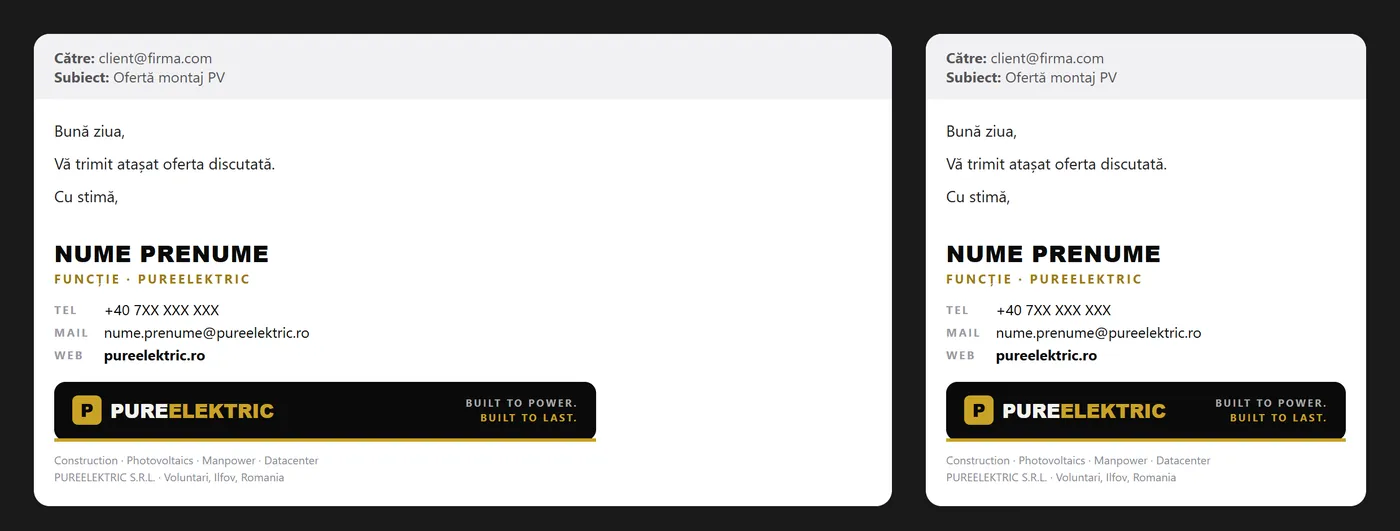
Every e-mail your company sends ends with the signature. We build it in HTML, with the logo hosted online, so it looks the same in Gmail, in Outlook and on a phone, without turning up as an attachment.
What you get
The deliverables, in short. What exactly is included goes in the quote.
- 01
A signature in your identity
Name, role, phone, e-mail, website and socials, with your logo and brand colours, in a layout that holds up on small screens.
- 02
Tested HTML
We check it in Gmail, Outlook and Apple Mail, on desktop and on phones, before we send it to you.
- 03
Hosted logo, not attached
The image loads over https from a domain, so it doesn’t show up as a paperclip or bloat the e-mail.
- 04
One for every person
You send us the list of names, roles and phone numbers, and each person on the team gets their own signature, in the same style.
- 05
A version for replies
A shorter signature for replies and forwards, so the thread stays tidy.
- 06
Animated logo, if you want
The logo can move in the signature, with a complete first frame so it still looks right in Outlook.
- HTML signature code
- Logo hosted over https
- Short version for replies
- Set-up steps: Gmail, Outlook, Apple Mail
- One signature per person
How we work
Four steps, from the first message to the final files.
- 1
What, how many, where
You tell us what gets printed, in what format and how it is handed out. If you already have a print shop, we work to its specs.
- 2
The layout
We design on the real format, with your copy and a hierarchy built for whoever reads it.
- 3
Adjustments and proofing
We proof the copy and the details together. Rounds of changes are written in the quote.
- 4
Print-ready file
A PDF with bleed and safe margins, plus a version for screens. On request we also handle the printing, through our partner print shops.



Questions
What clients ask us.
Which e-mail programs does it work in?
The ones used most: Gmail, Outlook on Windows, Mac and the web, Apple Mail and the phone apps. We test it in each before delivery.
Can a signature send my e-mails to spam?
A properly built one won’t. What matters more is that your domain has SPF, DKIM and DMARC. We wrote about it in an e-mail signature that stays out of spam.
Will you help me install it?
Yes. You get the set-up steps for your e-mail program, and for a team we can install it ourselves, person by person.
Do you handle the printing too?
Yes, if you want. We work with partner print shops and tell you which paper and finish suit what you are printing. You can just as well take the files to your own printer.
What files do I get?
A print PDF (CMYK, with bleed and safe margins) and a screen version, so you can also send it by e-mail or WhatsApp.
How much does it cost?
It depends on what it covers: how many pieces, how many versions, whether printing or production is included. Tell us what you need and we come back with a clear quote, after a short talk.
From the blog
Short guides on the topic, written in the studio.
Related
Goes well with
Optical Marketing
Let’s start.
Tell us in two lines what you need. We come back with a plan and a clear quote.